

In this content, we will explore which cloud storage is the best, analyzing reliable platforms, their pros, cons, and features offered.
Cloud storage is an indispensable tool for those seeking security, practicality, and quick access to files on any device.
Discover how to make the most of free versions and choose the one that best meets your needs.
Table of Content
What is cloud storage and how does it work?
Cloud storage is an increasingly popular technological solution that allows you to store data securely on remote servers, accessible via the internet.
Instead of keeping files on physical devices, such as hard drives or pen drives, users can store them in specialized data centers, with the ability to access them from anywhere and at any time.
Read also:
- ChatGPT 4 Free: 6 ways to use without paying
- How to Free Up Space on Google Photos: Step by Step
- The Best Photo Collage Apps for Your Phone
This method offers several advantages, including greater security, ease of access, and scalability. Furthermore, cloud storage options are often flexible and can be adjusted according to the user's needs, whether for individuals or companies. Throughout this article, we will explore the main aspects of this service and how it can benefit your digital routine.
The best free cloud storage platforms
Below, we provide an in-depth analysis of each free cloud storage service, including their main features, advantages, and limitations. With this information, you can decide which cloud storage is the best for your needs. In addition, you can evaluate if there is unlimited cloud storage, so be sure to check it out!
1. Google Drive
- Availability: compatible with Android, iOS, Windows, and Mac;
- Initial free space: 15 GB.
The Google Drive is one of the most complete and popular solutions on the market. Developed by Google, it offers a wide range of functionalities that go beyond storage. Its integration with Google Workspace (Docs, Sheets, Slides, and others) allows you to create, edit, and share files directly from the cloud, without the need for additional programs.
How to access Google Drive?
- Computer: access the Google Drive website and log in with your Google account. You can use the web interface to send, organize, and download files;
- Phone: the app is available for free download on the Google Play Store (Android) and the App Store (iOS).
Pros:
- Ample free space: 15 GB is one of the largest free capacities on the market;
- Integrated tools: with Google Workspace, you can create and edit documents directly in the cloud;
- Easy sharing: allows sharing files or folders with public or private links;
- Automatic backup: ideal for storing photos, contacts, and even Android messages.
Cons:
- Shared space: the 15 GB is divided between Google Drive, Gmail, and Google Photos;
- No free unlimited plan: larger plans require a subscription.
Free plan limitations:
Despite the generous space, integrated use can quickly consume the 15 GB, especially for those who receive many emails with attachments or back up high-resolution photos.
Tip: to free up space, delete large files, such as old videos, unnecessary emails, and old phone backups.
2. Dropbox
- Availability: compatible with Android, iOS, Windows, Mac, and Linux;
- Initial free space: 2 GB.
The Dropbox is a pioneer in the cloud storage market and is still one of the best options for those seeking efficient synchronization between devices.

With its intuitive interface and minimalist design, it is ideal for those who want simplicity in file management.
How to access Dropbox?
- Computer: access the Dropbox website or install the desktop app to automatically sync specific folders on your computer;
- Phone: available on the main app stores, the app allows you to upload photos, create folders, and access documents.
Pros:
- Fast synchronization: files sent from one device are instantly updated on others;
- Simple sharing: allows creating public links to send large files;
- App integration: compatible with popular tools like Slack, Zoom, and Trello.
Cons:
- Limited free space: only 2 GB, insufficient for larger files or multiple projects;
- Limited premium resources: some tools, such as version history, are exclusive to paid plans.
Free plan limitations:
Limited storage is a major obstacle for users who work with many files. In addition, there is a limit for devices connected simultaneously in the free version.
Tip: use Dropbox to store small files and use other services for larger files.
3. OneDrive
- Availability: Windows, Android, iOS, and Mac;
- Initial free space: 5 GB.
The OneDrive, developed by Microsoft, is the perfect choice for those who already use the Windows ecosystem and the Office suite apps. It offers direct integration with Word, Excel, PowerPoint, and Outlook, facilitating workflow in corporate or academic environments.
How to access OneDrive?
- Computer: it is integrated into the Windows system. Just log in with your Microsoft account. Mac users can download the app from the official website;
- Phone: the app is available for free for Android and iOS, with automatic photo backup features;
Pros:
- Automatic synchronization with Windows: allows saving documents directly to OneDrive when creating or editing in Office;
- Offline access: available for previously synchronized files;
- Security: offers two-factor authentication options.
Cons:
- Limited free space: only 5 GB on the basic plan;
- Limited integration with Apple devices: it works, but it is not as intuitive as iCloud.
Free plan limitations:
The space can be quickly filled by automatic backups or large media files.
Tip: Disable automatic backup of large folders, such as “Pictures” or “Videos”, to save space.
4. MEGA
- Availability: Android, iOS, Windows, Mac, and Linux;
- Initial free space: 20 GB.
The MEGA is an excellent option for those seeking unlimited cloud storage in terms of security.
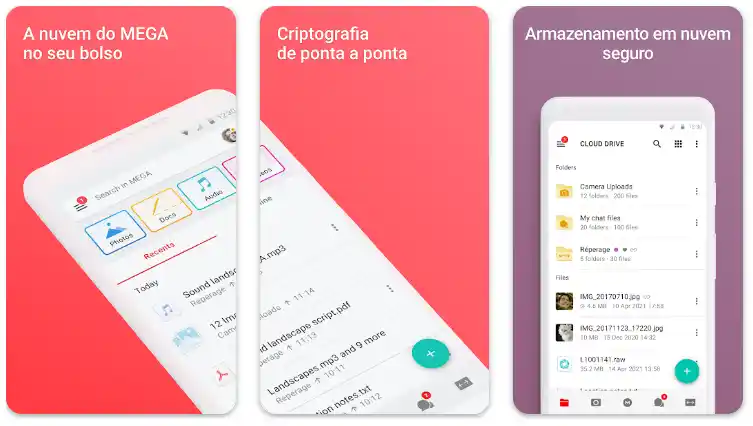
Its end-to-end encryption ensures that only you have access to your data, making it a popular choice among users concerned with privacy.
How to access MEGA?
- Computer: access the official MEGA website to send files or install the desktop app for automatic synchronization;
- Phone: the app is simple and offers automatic photo backup.
Pros:
- Generous free space: 20 GB for new users, with bonus options for inviting friends;
- High security: data is encrypted before being sent;
- Advanced features: has an integrated secure chat for communication.
Cons:
- Transfer limit: the free plan restricts the amount of data that can be sent or downloaded per day;
- Complex interface: can be intimidating for beginner users.
Free plan limitations:
Transfer restrictions can be frustrating for those who need to access large files frequently.
Tip: Use MEGA to store confidential and important documents, but consider other platforms for constant file sharing.
5. iCloud
- Availability: iOS, Mac, and Windows;
- Initial free space: 5 GB.
For users of the Apple ecosystem, the iCloud is practically indispensable. It automatically syncs photos, contacts, notes, and other data, ensuring that all information is available on your devices.
How to access iCloud?
- Computer: Mac users have iCloud integrated into the system. On Windows, it is necessary to install the app;
- Phone: iCloud is automatically activated on iOS devices.
Pros:
- Automatic synchronization: ideal for automatic backups and integration with native Apple apps;
- Accessibility: allows restoring devices easily with saved data;
- Security: offers advanced features, such as two-factor authentication.
Cons:
- Limited space: the 5 GB are quickly consumed by device backups
- Less useful outside the Apple ecosystem: despite working on Windows, it is not as intuitive as other options.
Free plan limitations:
In addition to the limited space, it is not possible to disable automatic backups of applications, consuming space unnecessarily.
Tip: Use iCloud only to save essential documents and disable automatic backups of rarely used apps.
Comparison between free cloud storage platforms
Below, you will find a detailed comparison of the main free cloud storage platforms, considering space, features, security, and limitations, to assist in your choice.
| Platform | Free Space | Features | Limitations | Security | Availability |
|---|---|---|---|---|---|
| Google Drive | 15 GB | Integration with Google Workspace, automatic synchronization | Limit of 15 GB for all Google services | Encryption in transit and at rest | PC, Android, iOS |
| Dropbox | 2 GB | Fast synchronization, integration with various tools | Limit of 2 GB in the free version | Encryption in transit and at rest | PC, Android, iOS |
| OneDrive | 5 GB | Integration with Office 365, file synchronization | Limit of 5 GB for the free version | Encryption in transit and at rest | PC, Android, iOS |
| iCloud | 5 GB | Integration with Apple devices, automatic backup | Limit of 5 GB for photos, documents, and backups | Encryption in transit and at rest | PC, Mac, iOS |
| pCloud | 10 GB | Synchronization, automatic backup, support for multiple file formats | Limit of 10 GB, with the possibility to gain more space through promotions | Encryption in transit and at rest | PC, Android, iOS |
Quick tips:
- Google Drive is ideal for those who already use the Google ecosystem and need integration between various tools;
- Dropbox offers excellent synchronization, being a good option for those who need ease in collaboration and sharing;
- OneDrive is the best choice for those who regularly use Microsoft Office;
- MEGA is recommended for those who prioritize security and encryption, being excellent for storing sensitive data;
- iCloud is perfect for Apple device users, but with limited space, it is better for those already immersed in the Apple ecosystem.
Benefits of using cloud storage platforms
Below, you can explore the various advantages that cloud storage offers, such as:
- Accessibility from anywhere: the ability to access your files from different devices and locations;
- Security: how cloud platforms implement encryption and automatic backup to protect data;
- Saving physical space: eliminating the need for physical storage devices such as hard drives and pen drives;
- Easy sharing and collaboration: how the cloud facilitates file sharing with other people and real-time collaboration;
- Backup and data recovery: how the cloud offers an easy and secure way to back up important files and recover them in case of failures.
Frequently asked questions about cloud storage
Check out the answers to the most common questions about cloud storage, helping you choose the best platform and optimize your use in a safe and efficient way.
How to choose the best cloud storage platform?
Choosing the best platform depends on your specific needs. If you are looking for more free space, Google Drive and pCloud stand out, with generous offers in their free plans. On the other hand, if you are more interested in efficient integration with other services, OneDrive may be the best option, especially for those who use the Office 365 suite.
What happens if I exceed the free storage limit?
If you exceed the free storage limit, you will have two options: either you choose to pay for extra space, or you need to free up space by deleting old files.
Some platforms offer a way to optimize space usage, such as Google Drive, which allows you to delete old files that you no longer access or use backup tools to keep old data out of the main space.
What are the main security risks in cloud storage?
Although cloud storage is generally secure, it is important to be aware that security also depends on the settings you choose.
Make sure to use strong passwords, enable two-factor authentication, and choose platforms that use end-to-end encryption, such as Dropbox and Google Drive. In addition, be careful with inadvertent file sharing.
Is it possible to use cloud storage on mobile devices?
Yes, most cloud storage platforms, such as Google Drive, Dropbox, and OneDrive, offer mobile apps. These apps make it possible to access, share, and edit files directly from your phone or tablet, ensuring practicality and flexibility for everyday use.
Is cloud storage safe for storing sensitive documents?
Cloud storage is safe, but security will depend on the platform and the privacy configuration you choose. Platforms like pCloud and Google Drive offer encryption in transit and at rest, which ensures the security of your data. However, for highly sensitive files, it may be advisable to add an extra layer of security, such as encrypting files before sending them to the cloud.
Conclusion
Choosing the best cloud storage platform depends on your needs. If you are looking for productivity, Google Drive is an excellent choice. For those who prioritize security, MEGA stands out. Apple users can benefit from iCloud. Evaluate the pros and cons of each solution and choose the one that best suits your routine.

