

If you are a Roblox player, you had some bad news in the last few days: the Roblox Voice Chat is Blocked! But don't worry, here you will find out why both the voice and text chat in Roblox are blocked and how to unlock it even without meeting the requirements!
First, don't worry! This is not a bug or you are not being penalized, risking having your account banned; the chat has been blocked for everyone, understand more below:
Table of Content
Why was the Roblox Voice Chat blocked?
Both Roblox chats (voice and text) started to be officially blocked on January 7th, due to new Roblox security rules for child protection, avoiding the risk of inappropriate contact between children and adults within the platform.
This restriction came about due to several complaints and reports from around the world regarding cases of predators using the platform to lure minors.
See also:
Groups based on age range
To unlock the chat now, it is necessary to do a verification by photo, where the platform will examine the user's photo and estimate the age. Thus, the platform will create groups based on age, where it will be possible to interact only with the same group. The groups are the following:
- Under 9 years old: Are prohibited from using Voice and Text Chat!
- Teenagers (9 -17 years old): Can use the chats, and can talk with the same group, the groups are divided between:
- Adults (18+): Need to do facial recognition and send a document to release access to the chats.
Check below the groups separated by age, and with whom they can interact within Roblox:
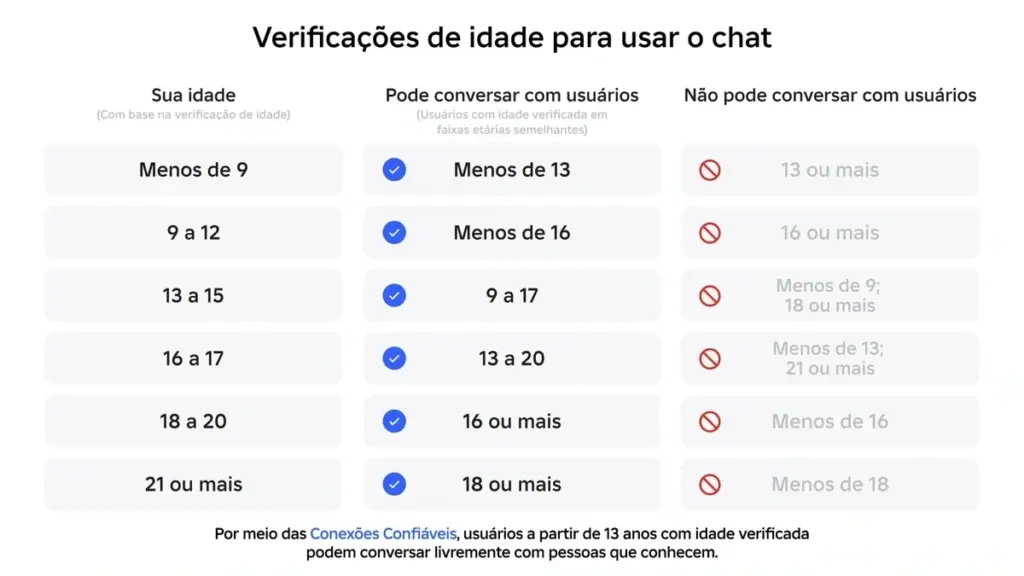
It will not be possible for minors to interact via text or voice chat with adults in the new system. And those under 13 years old will need parental approval to unlock the chat.
How to Unlock Roblox Voice Chat

When you access the platform, you will receive a message in a pop-up to unlock the chat; if you don't receive it, just follow the steps below. I will teach you how to unlock on the main platforms where Roblox is played:
- On Android or iOS, go to More in the bottom menu, scroll down to find Settings; On computer, Playstation and Xbox, click on the gear at the top to open settings.
- Click on Privacy and content restrictions;
- Select Communication and Experience chat;
- Click to turn on Experience Chat. This will open a window asking to do the verification to release the chat;
How to do the Verification
In the Pop-up asking to do the verification click on continue, this will open a new tab with information to verify through the camera; all photos and videos will be deleted as soon as you confirm the verification, therefore, don't worry. Click on continue again until the cell phone camera opens. If it asks for permission to access the camera, photos, or smartphone files, allow it.
With the camera open, find a well-lit place, preferably with a white background, and follow the verification steps presented on the screen, center the face, turn to the sides as requested.
The Roblox system will do a verification on the sent images to compare and make an estimate if the age informed when creating the Roblox account matches the face.
Under 9 years old: when starting the verification, the responsible person will be requested. Click the “ask now” button and inform the responsible person's email. The responsible person will receive an email asking for information to confirm the responsible person's identity using an identity document or credit card. Once done, they can click “allow” and the child will be able to continue the verification normally in the steps informed above.
Is it possible to bypass the Roblox Voice Chat Verification?
It is impossible at the moment to use the chat without doing the verification; it will stay blocked until it is verified. Yes, there are ways to bypass it, and it is not very difficult, and over time more and more methods will be discovered, invented by the community.
Bypassing is not difficult, for example, one can ask another person to verify, just be careful with the age informed when creating the account and the age of the person who is verifying. For example, you are 10 years old, created the account with your age and asked for your father to verify, it won't work!
Up to the moment, it is not known how to bypass the verification completely, and it is good that this is not done, after all, it is for your own safety. But even if you bypass the age verification, there is still the limitation of speaking only with people in your age range, this cannot be bypassed.
Risks of Bypassing the verification
Besides the risks that you can end up exposing yourself on the platform by avoiding the implemented security methods, there is the clear risk of having your account banned on the platform. After all, this new layer in security is exactly to avoid that adults with bad intentions interact with children. And if you bypass this, it can end up triggering the Roblox alert leading to your account being banned.
Any method that bypasses the rules imposed by the platform can result in a total ban of the account, from the use of scripts, third-party software to gain an advantage, or bypassing security methods!
Alternatives to Voice Chat
An alternative to Voice Chat for those who don't want to do the verification already exists and is widely used by the community. Using third-party tools, which is already more common than normal. Using Discord to make calls with friends, or WhatsApp.
DO NOT ENTER INTO CALLS WITH UNKNOWN PEOPLE! Interact both in Roblox and in other platforms only with acquaintances, and in any suspicion, weird conversation, or even insistence from friends, show the conversations to your parents!
Conclusion
Here you found out how the new security layer that ended up blocking Roblox voice chat works, even if temporarily. Roblox implemented this security amidst various investigations and reports from all over the world of people with bad intentions interacting with children through Roblox experiences.
The new limitation of Roblox text and voice chat that after the verification will release the interaction only between accounts with a similar specific age range. Adults in general will be able to interact only with adults.
Bypassing this security can end up leading to your account being banned, or at least being work in vain. After all, if you are a child and do verification as an adult, you will not be able to interact with your friends using accounts of minors.

